
Strategic plan software for cities that keeps the promises in your plan.
StrategyHub™ helps local governments manage their strategic plan, hold every department accountable, and show residents the results of the city's work — long after the plan is adopted.

From adopted plan to delivered results
Four things every city needs once the plan is approved.
Manage your strategic plan
Keep council-adopted goals, department initiatives, actions and KPIs in one live plan — not a PDF that sits on a shelf.
Hold people accountable
Every initiative, action and KPI has a named owner and due date. Automatic reminders and update requests keep departments reporting on time.
Show the public the results
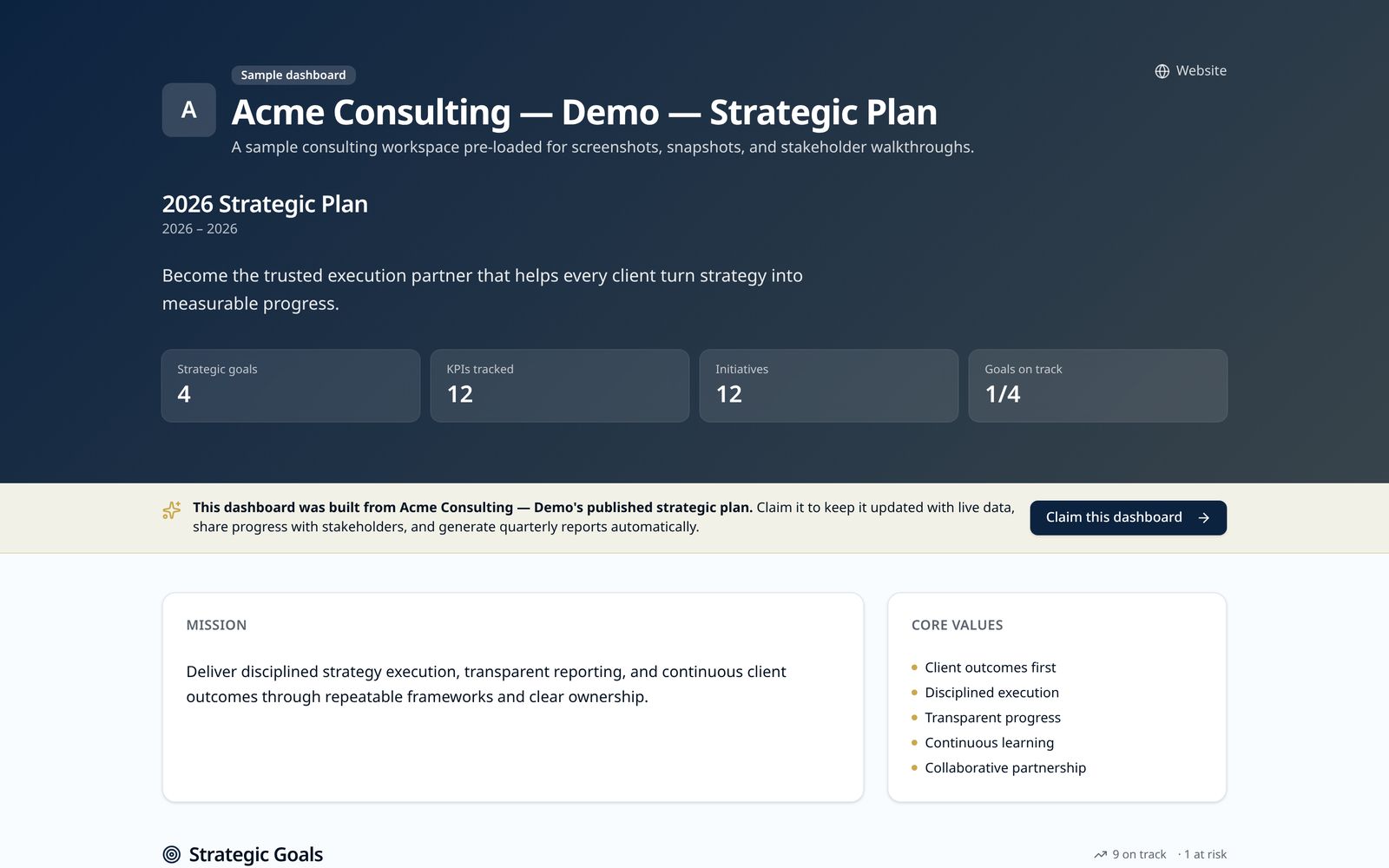
Publish a public progress page so residents can see what the city committed to and how each goal is tracking.
Deliver on your promises
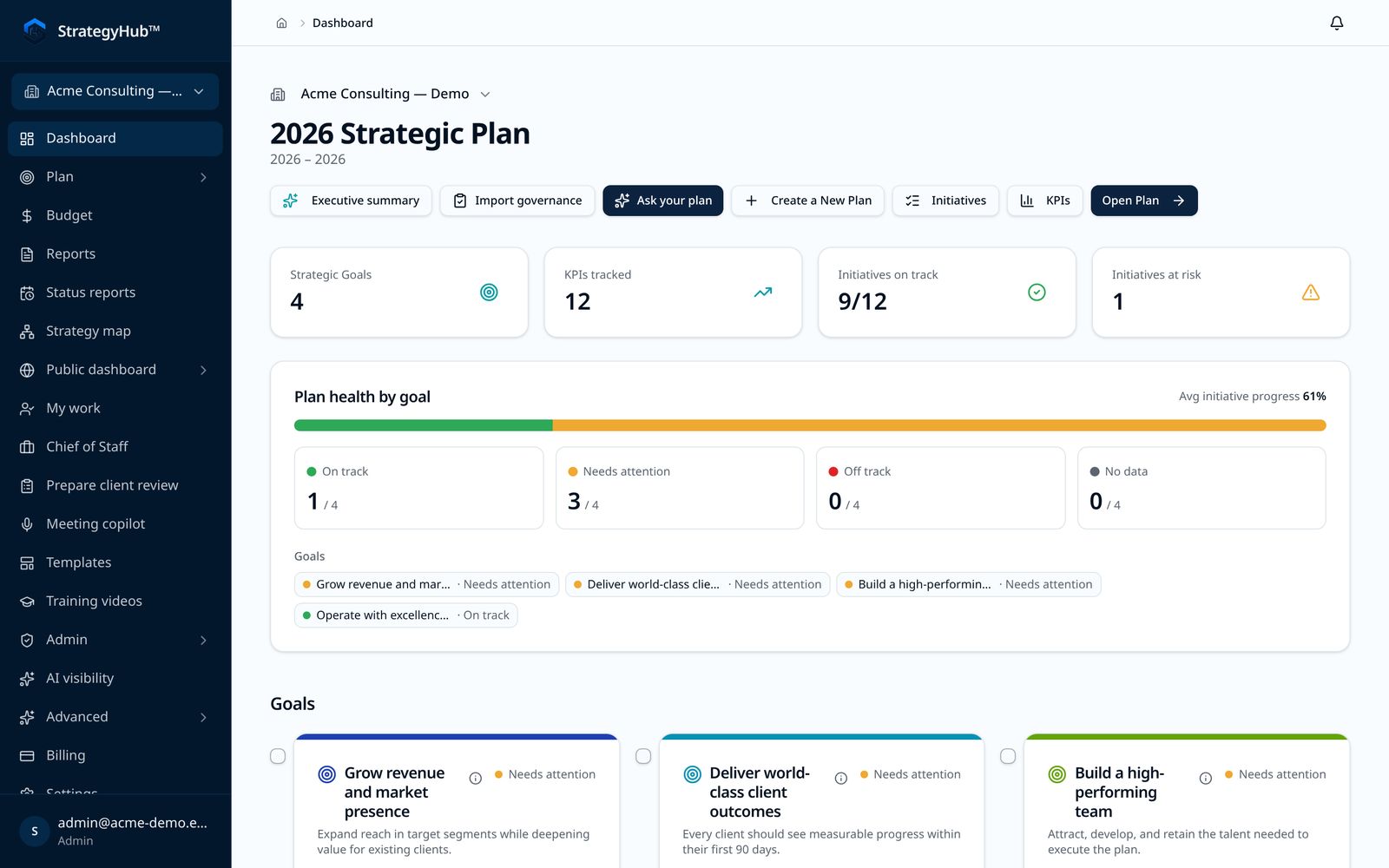
Status, baseline, current and target values make it clear what's on track, what's slipping, and what needs a decision.
How cities use StrategyHub™
Municipal strategic plans
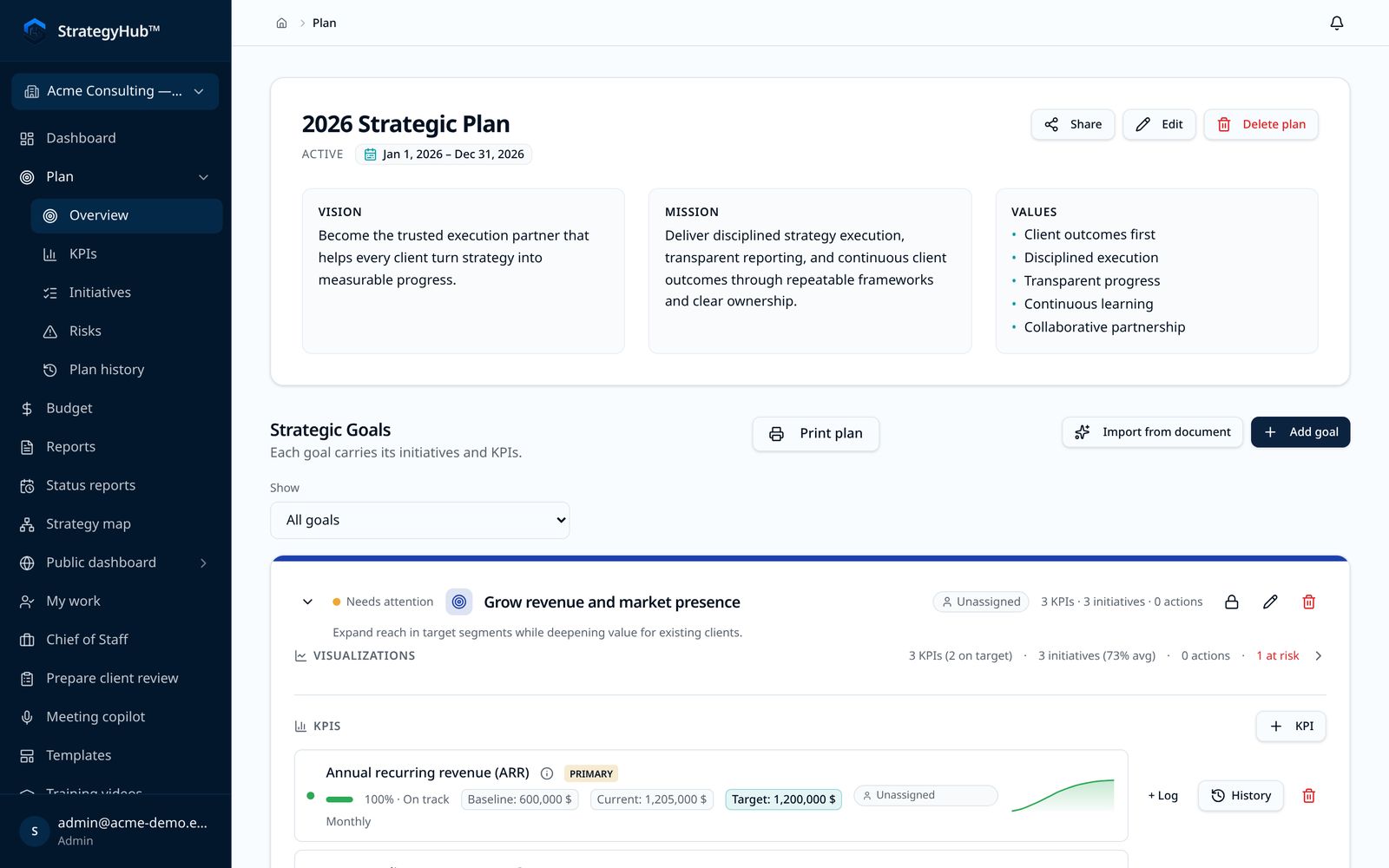
Import an existing plan, organize it by goal, and track initiatives and KPIs goal by goal. Print or export the full plan the way it appears on screen.
Department accountability
Give each department head their own work view. Owners log progress; leadership sees overdue and missing updates at a glance.
Public-facing transparency
Share a read-only public dashboard of goals and progress. Residents don't need an account to view it.
Keeping promises after adoption
Snapshots record where the plan stood at each review, so council and staff can see what changed between meetings.
Evaluating for procurement? See our Public Sector Addendum and security overview.
How a city runs its strategic plan, from adoption to the next council review
A city strategic plan is usually adopted at a council meeting and then handed to staff as a PDF. The hard part starts after the vote: turning each goal into department work, keeping progress current between meetings, and reporting back in a way council and residents can follow. StrategyHub™ is built around that sequence.
1. Load the plan council adopted
Upload the adopted plan as a PDF, Word, PowerPoint, Excel or CSV file, or enter it directly. StrategyHub™ extracts the goals, initiatives, actions and KPIs, and staff review that structure before anything is saved. A plan written in a different framework may need adapting so every item sits under a goal. Plan import is available during the 14-day trial.
2. Give every commitment a department and an owner
Each goal, initiative and action gets a named owner and a due date. Department directors see the work their department owns. The city manager's office can see who is responsible for each commitment council approved, instead of one plan coordinator chasing every department by email. There is no per-user charge, so the people doing the work can all be in the workspace.
3. Set measures with a baseline and a target
Each KPI records a baseline, a current value and a target, and shows red, amber or green from pace against that target. An owner can enter the value, a contributor can submit it through a tokenized email link without a login, or the measure can sync from Google Sheets, BigQuery, Snowflake, a CSV file or the API. How to choose KPIs covers picking measures a department can actually report.
4. Collect updates between meetings
Owners get update requests and reminders when an update is due. Leadership sees overdue and missing updates at a glance, so a stalled initiative shows up before the council meeting, not during it.
5. Report to council and the city manager
Report books, executive summaries and snapshots are built from the live plan. A snapshot records where the plan stood at each review, so council and staff can see what changed between meetings. The full plan can be printed or exported the way it appears on screen.
6. Publish progress for residents
Turn on the public progress page to share a read-only view of the plan with residents. It updates as owners report, and residents open it from a link without creating an account.
7. Line the plan up with the budget
Budget alignment views (a heatmap, a treemap and a sankey) show how dollars attach to goals. That is useful when the budget calendar and the strategic plan come up in the same season. The annual strategic planning calendar guide shows how to schedule the two together.
Strategy execution software for local government
Strategic planning produces the plan. Strategy execution is everything after adoption: owners, deadlines, measures and a regular review. A city has two pressures a company does not: elected officials and city managers change, and residents expect to see results in public. Strategy execution software for a city has to survive both. StrategyHub™ is strategy execution software priced for one local government: $9,500 per year, flat, with unlimited departments and users.
When a city compares options, these are the questions that separate them:
- Can every initiative and action have an owner and a due date, including staff who are not full-time strategy or performance staff?
- Can a department submit a KPI value without a license or a login?
- Is a public progress page included in the price, or sold as an add-on?
- Does the price stay the same when you add departments and users?
- Can you pay by invoice or purchase order, and can procurement get a W-9 and a sole-source letter?
- Can you try it on your own adopted plan before signing a contract?
Project tools such as Asana, monday.com and Jira track tasks well, but they do not hold the goal, initiative and KPI structure council adopts. Spreadsheets hold the structure but have no owners, reminders or history between reviews. For vendor-by-vendor detail, read StrategyHub™ vs Envisio and the sourced strategy execution software comparison, which quotes each vendor's own pricing page.
What residents see on the public progress page
The public progress page is a read-only dashboard of the city's plan. It is included in the city price, not sold separately.
- The goals the city committed to, organized the way the plan is organized.
- The KPIs under each goal and how each goal is tracking.
- Progress that changes as owners report, rather than once a year in an annual report.
- No resident account, login or app.
Staff decide when the plan goes public. A plan stays private until someone turns public sharing on, and it can be made private again. A practical order is to publish after the first round of department updates, so the first thing residents see is current.
Who in city hall uses it
- City manager and assistant city managers: see every department's commitments in one place and walk into council meetings with current numbers.
- Department directors: own their initiatives and KPIs, assign actions to their staff and answer update requests.
- Budget, performance or strategy staff: maintain the plan structure, run the review cycle and prepare report books. Cascading goals across departments explains how to connect citywide goals to department work.
- Council members and the clerk: follow progress through reports, snapshots or the public page.
- Residents: read the public progress page without an account.
If the plan is still being written, start with our guide to strategic planning for city governments. If it was adopted and has stalled, why strategic plans fail covers the usual causes and how to restart the review rhythm.
City pricing
One flat annual price per city. No per-seat fees.
Per city, billed annually
- Unlimited departments
- Unlimited users
- Public progress page for residents (included)
- Plan import during your trial
- Pay by invoice or purchase order
We accept purchase orders and purchasing cards. W-9 and sole-source letter available. Annual terms.
Your 14-day trial
We'll import your adopted plan for you during the trial.
What to do in your 14 days
- 1Load your plan
- 2Set up two departments
- 3Publish one public progress page
See it in the product
Screens from a sample workspace — not a real city's data.
Where the method comes from
StrategyHub™ comes out of the strategic planning work of Gamechangers Consulting, its founding firm, with public-sector and mission-driven organizations including the City of Doral, FIU's Jack D. Gordon Institute for Public Policy and U.S. Southern Command. That consulting work is where the product's structure comes from. It is named here as background, not as a software result.
The product is built for what happens after a plan is adopted: confirming who owns each commitment, keeping numbers current between meetings, and running reviews from the live plan instead of rebuilding a slide deck each quarter.
What municipal leaders say
Municipal leaders who've partnered with Gamechangers Consulting, StrategyHub™'s founding firm, on strategic planning and governance. These quotes describe that consulting work, not product reviews.
"Gamechangers Consulting was an outstanding partner in advancing our strategic planning and governance efforts. Their expertise in facilitating executive-level discussions, aligning organizational priorities, and strengthening governance practices helped position our organization for greater accountability, effectiveness, and long-term success."
 Fernando CasamayorAssistant City Manager / Chief Financial Officer · City of Doral
"We appreciated the leadership of Sergio as we endeavored to work on the strategic plan. Great day and great results."
Questions from city managers and clerks
- How much does strategic plan software for a city cost?
- StrategyHub™ for Cities is one flat $9,500 per year per city. That includes unlimited departments, unlimited users and a public progress page. You can pay by card or by invoice or purchase order.
- Can we load the strategic plan our council already adopted?
- Yes, for plans that map to goals, initiatives, actions and KPIs. Upload a PDF, Word, PowerPoint, Excel or CSV file and review the extracted structure before anything is saved. Plan import is available during your 14-day trial.
- Can residents see our progress?
- Yes. Every city plan includes a public progress page that shows goals and how each is tracking. Residents do not need an account to view it.
- Does StrategyHub™ write our strategic plan?
- No. StrategyHub™ runs the plan once it exists: owners, due dates, KPIs and review snapshots. If you are still building the plan, expect the process to take about two to three months. Our guide to strategic planning for city governments covers the steps.
- How do departments report progress?
- Each initiative, action and KPI has a named owner and due date. Owners get reminders and update requests, and leadership sees overdue and missing updates at a glance. Occasional contributors can submit KPI values through a tokenized email link without a login.
- Where is our data hosted, and what is the security posture?
- Data is hosted in the United States (AWS us-west-2) with row-level tenant isolation, an audit log, MFA, and a signed DPA on request. We are not SOC 2 or ISO 27001 certified today. Our security page lists the current controls and disclosed gaps.
- What happens after the 14-day trial?
- You choose a plan and enter billing. No credit card is required to start the trial. If you do not choose a plan, the workspace goes read-only and nothing is deleted for 60 days.
- Is StrategyHub™ a project management tool for cities?
- No. A project tool tracks tasks. StrategyHub™ tracks whether the commitments in the city's adopted strategic plan are moving: goals, initiatives, actions and KPIs with owners, due dates and a review history. Initiatives still have owners and due dates, but each one sits under a goal council adopted.
- Can a county, town or other local government use the city plan?
- Yes. Counties, towns and other local governments use the same organization plan: $9,500 per year, flat, with unlimited departments and users and a public progress page included.
- What happens to the plan when council or the city manager changes?
- The plan, its owners, KPI history and review snapshots stay in the workspace. A new council or city manager can see what was committed and how it has tracked, and owners can be reassigned without rebuilding the plan.
Resources for city staff
- Strategic planning for city governments
How cities build plans that survive election cycles, budget dates and public scrutiny.
- Buying strategic planning software in local government
Procurement thresholds, security questions and evaluation criteria.
- StrategyHub™ vs Envisio, ClearPoint and AchieveIt for cities
A sourced comparison for municipal buyers.
- Security and US data residency
Procurement-grade overview for IT and the clerk's office.
- Strategy execution software
What the category covers for a city, county or company leadership team, and how StrategyHub™ runs the plan.
- Why strategic plans fail
The common reasons adopted plans stall, and how to restart the review rhythm.
- Cascading goals across departments
Connecting citywide goals to the work each department owns.
- Annual strategic planning calendar
Scheduling plan reviews alongside the budget cycle.
- All strategy guides
The full library on planning, execution, KPIs and buying strategy software.

Sergio Tigera
Founder, StrategyHub™ · strategy practitioner
Sergio Tigera is the Founder & CEO of Gamechangers Consulting, a firm that helps organizations transform strategy into action through leadership development, culture change, and organizational alignment. With more than 20 years of experience spanning corporate leadership, higher education, and consulting, he has built a reputation for helping leaders and teams achieve meaningful and lasting results. Prior to founding Gamechangers, Sergio spent 14 years with Caterpillar in leadership roles across North America, Europe, and Latin America, and later served in executive leadership positions at Florida International University and The Pacific Institute. He hosts the Gamechangers Podcast, is a South Florida Business Journal “40 Under 40” honoree, and holds an Executive MBA from Florida International University.